Direct Traffic Doesn't Always Mean Someone Typed Your URL
The largest row in many analytics reports is the one nobody can explain. Here is what is actually in it, why short links and QR codes end up there, and how to make it smaller with tagged links.
11 March 2026 · 7 min read · updated 10 October 2026
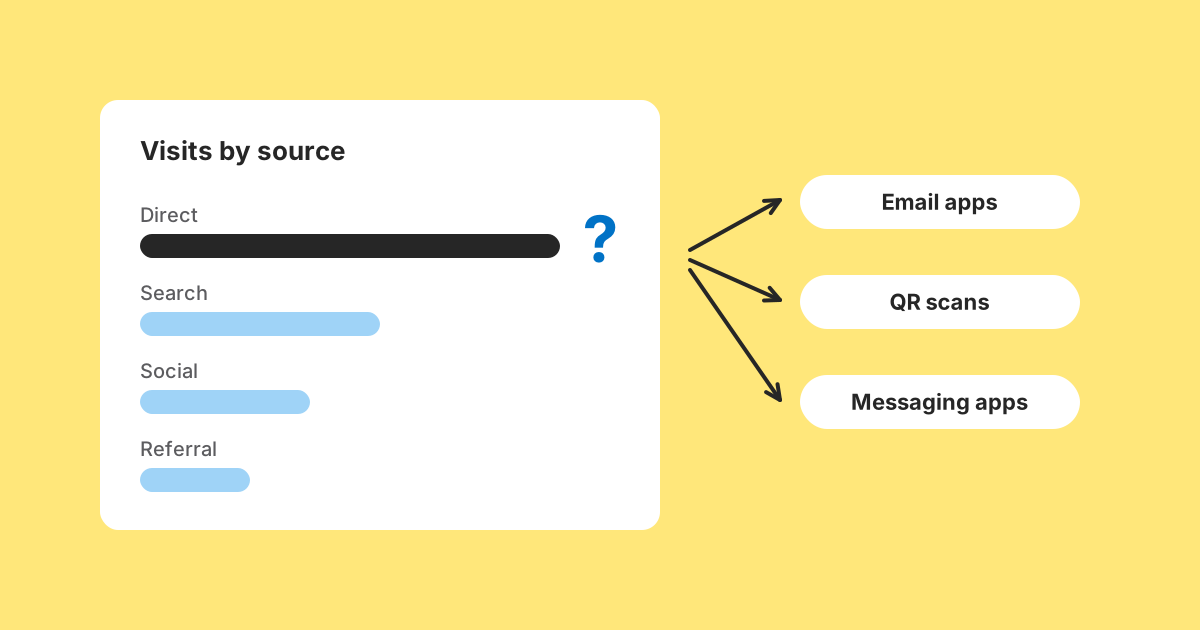
Open almost any analytics report and there is a row near the top labelled direct, (direct) / (none), or something equally unhelpful. It is often one of the largest sources, and the natural reading is that a lot of people typed your address in.
Few of them did. Typing an address from memory is uncommon outside a handful of sites people use daily. Direct is not a description of what visitors did. It is where a visit is filed when nothing arrived to say where it came from.
This matters if you share links in newsletters, chats, printed material or QR codes, because those are exactly the visits most likely to land in this bucket. The good news is that most of it is fixable, at your end, with tagged links.
How analytics decides where a visit came from
Most analytics tools look at two things when a visit lands. First, campaign parameters in the address, such as utm_source and utm_medium. If they are present, the visit is filed under them. If not, the tool looks at the Referer header (or document.referrer in a script), which the browser may send to name the page the link was on. If that says a search engine or a social site, the visit is filed there.
If neither is present, the visit is direct. It still counts; it just has nowhere better to go. Some tools apply extra rules, for instance keeping a returning visitor's earlier campaign source for a period, but the basic order is the same: parameters, then referrer, then direct.
The referrer half of that is not in your control. The browser sends it, and the page the link was on sets a policy for how much is sent. Current browsers default to strict-origin-when-cross-origin, which sends just the origin to other sites and nothing at all from an HTTPS page to a plain HTTP one.
What is actually in the direct bucket
Links opened from apps
Messaging apps, email clients, PDF readers, spreadsheets, presentation software and note apps. A link in a chat message or a slide deck usually has no referring web page, so the visit arrives with no referrer. This is frequently the largest contributor, and the one people forget.
Email, including webmail
Desktop and mobile email apps generally send no referrer. Webmail runs in a browser, but webmail services commonly strip or reduce the referrer to protect the reader. Either way, an untagged newsletter link is a strong candidate for direct.
QR codes
A phone's camera opens the address straight in a browser. There is no page involved, so there is no referrer. Every scan of an untagged QR code is, as far as your analytics is concerned, someone typing your address.
Strict policies on the referring site
Sites can tell browsers to send no referrer at all, with a no-referrer policy or rel="noreferrer" on their links. A link from such a site arrives looking exactly like a typed address.
Secure to insecure transitions
A browser using the default policy sends no referrer when moving from an HTTPS page to an HTTP one. If your site, or a landing page you use, is still on plain HTTP, visits from secure pages arrive blank.
Browsers and extensions that strip it
Some browsers, privacy modes and content blockers reduce or remove referrers further. How much this affects you depends on your audience.
Genuine direct traffic
Bookmarks, typed addresses, and links from places like a home screen shortcut. This is real, and it is often a smaller slice of the row than its name suggests.
Where short links fit in
A short link does not by itself make traffic direct, and it does not by itself fix it either.
LinkMint answers a short link with an HTTP 302 redirect. When the link is clicked on a web page, the browser normally sends the destination a referrer based on that page, subject to that page's policy, as it would for a direct link. When the link is opened from an app, an email or a QR code, there was no page, so there is no referrer either way. Behaviour can vary between browsers and apps, but the redirect is not usually what removes the referrer.
What a short link cannot do on LinkMint is count anything. LinkMint records nothing when someone follows a link: no clicks, no referrers, no countries. So if three untagged short links all point at the same page, your analytics cannot tell them apart and LinkMint has no numbers to offer either. The attribution has to travel in the destination address, as UTM parameters, and LinkMint keeps query strings byte for byte so the tags arrive intact.
The tell that direct is really a campaign
Genuine direct traffic is usually fairly steady. It tracks the people who already know about you, which does not change much from day to day. So a sudden spike in direct is rarely a sudden rise in people remembering your address. It is more often a campaign whose source did not survive the trip.
Mon   direct: 210    social: 40
Tue   direct: 195    social: 38
Wed   direct: 980    social: 45     ← newsletter went out
Thu   direct: 610    social: 41
Fri   direct: 240    social: 39
Nothing in Wednesday's row says newsletter. But direct jumped several times over and returned to its usual level within two days, which is the shape of an email send, not of people spontaneously bookmarking you.
Making the bucket smaller
You cannot make browsers send referrers. You can stop depending on them for the links you place yourself.
Tag every link you share
UTM parameters live in the address, so they survive everything that strips the referrer. A link in a chat message carrying utm_source=whatsapp arrives fully attributed, because the information travels in the URL rather than in a header someone else controls.
Newsletter:  /menu?utm_source=newsletter&utm_medium=email&utm_campaign=autumn_menu   →  short link A
Group chat:  /menu?utm_source=whatsapp&utm_medium=social&utm_campaign=autumn_menu    →  short link B
Table QR:    /menu?utm_source=table_card&utm_medium=qr&utm_campaign=autumn_menu     →  short link C
Shorten each tagged variant separately. The short links keep printed material and QR codes tidy, and the tags inside them do the attribution in your analytics. Because LinkMint links cannot be edited or deleted, check each tagged address before shortening it, especially for anything printed.
Keep the vocabulary consistent
Decide your source and medium values once and write them down. Use lower case, because most tools treat Email and email as different values. Use medium values your analytics tool's channel rules recognise, such as email for email, or the visits may be grouped as unassigned rather than direct, which is a different unhelpful row.
Check for HTTP and lossy redirects
Serve every page over HTTPS. Then follow one of your tagged links all the way through and confirm the parameters are still in the address bar when the page finally loads. A redirect on your own site that drops the query string, say from http to https or from one path to another, quietly deletes the tags and sends the visit back to direct.
The mirror image: traffic that credits itself
Sometimes a visit arrives with a referrer, but the referrer is you. This happens when a journey crosses between hostnames you own, or through a payment provider that returns visitors to your site. The last hop is the one recorded, so your checkout page appears to be one of your best sources.
Most analytics tools have a list of hostnames to ignore as referrers. Put every hostname in your funnel on it, including payment providers and sign-in pages.
Two things not to do about it
Don't reconstruct it from device details
There is a temptation to fill the gap by matching visits on device type, screen size, timing and other traits. It produces numbers. It is also fingerprinting, exactly what browser privacy features are designed to prevent, and it turns a reporting inconvenience into a genuine ethical problem. The gap exists mostly because of deliberate choices by browsers, apps and the people using them.
Don't treat the number as broken
Some unattributed traffic is normal for every site. What matters is whether it is stable. If the unknown share is steady, you can still compare one week with the next and one campaign with the last, because the gap affects both sides. Comparisons survive incompleteness far better than absolute figures do.
A short checklist
- Every link you place yourself carries utm_source, utm_medium and utm_campaign.
- One tagged short link per channel, never one untagged link reused everywhere.
- QR codes encode a tagged short link, so scans are credited to the poster or card they came from.
- Values are lower case and come from a written list.
- Every page is on HTTPS, and your own redirects keep the query string.
- Your own hostnames and payment providers are excluded from referrals.
- No UTM tags on links between pages of your own site, which would overwrite the real source.
Do those and the direct row shrinks to something closer to its name: people who arrived with nothing to say how. Think of it as direct or unknown, rather than proof of a loyal audience typing your address, and it points you to the thing that actually helps: tagging your links.
Related reading
- What Referrer Data Can, and Cannot, Tell You
The referrer is one optional header, sent by the visitor's browser and limited by the page they came from. Knowing how browsers decide what to send explains most of what confuses people about referrer reports.
- UTM Parameters Explained Without the Marketing Jargon
Five labels you can add to a URL so your analytics can say where a visit came from. What each one means, which three matter most, and the small inconsistencies that quietly split your reports.
- QR Codes and Short Links Work Better Together
Encoding a short link instead of a long address gives you a coarser, easier code and a line of text people can type. Here is what that buys you, what it does not, and how to plan for a destination that might change.