QR Codes and Short Links Work Better Together
Encoding a short link instead of a long address gives you a coarser, easier code and a line of text people can type. Here is what that buys you, what it does not, and how to plan for a destination that might change.
1 July 2026 · 8 min read · updated 10 October 2026
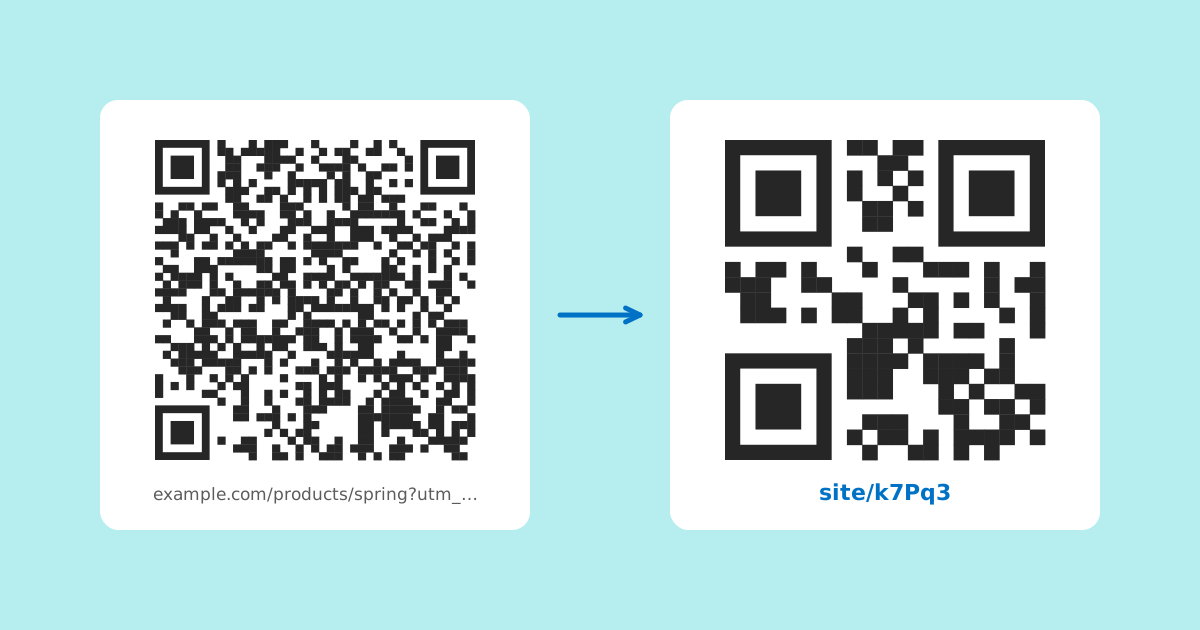
A long web address is awkward in two different ways. It is awkward for people, who cannot type it from a poster, and it is awkward for a QR code, which has to grow to hold it. A short link fixes the first problem directly and, less obviously, fixes most of the second.
This piece explains why, with the actual numbers from the QR specification, and is straight about the limits. On LinkMint a short link is permanent: it cannot be edited, deleted or counted. That changes how you should use it, and the last few sections cover what to do when the destination might move.
How a QR code grows with its content
A QR code is a square grid of dark and light cells called modules. The smallest size, version 1, is 21 by 21 modules. Each version above that adds four modules to each side, so version 2 is 25 by 25, version 3 is 29 by 29, and the largest, version 40, is 177 by 177.
The encoder picks the smallest version that can hold your content at the error correction level you chose. More characters means a higher version, which means more modules squeezed into the same printed square. Each module gets smaller, and small modules are what make a code slow or impossible to scan: blurred by a cheap camera, smudged by a printer, lost in the glare on a laminated card.
| Version | Grid | Level L | Level M | Level Q | Level H |
|---|---|---|---|---|---|
| 1 | 21 × 21 | 17 | 14 | 11 | 7 |
| 2 | 25 × 25 | 32 | 26 | 20 | 14 |
| 3 | 29 × 29 | 53 | 42 | 32 | 24 |
| 4 | 33 × 33 | 78 | 62 | 46 | 34 |
| 6 | 41 × 41 | 134 | 106 | 74 | 58 |
| 8 | 49 × 49 | 192 | 152 | 108 | 84 |
A worked example: the same destination, two payloads
Take a restaurant's dinner menu with campaign tags added so the restaurant can see table card visits in its own analytics.
https://example.com/menus/autumn/dinner?utm_source=table-card&utm_medium=qr&utm_campaign=autumn
  95 characters. At level M this needs version 6: 41 × 41 modules.

https://your-short-domain.example/k7mQx
  About 40 characters, less on a shorter domain. At level M this fits version 3: 29 × 29 modules.
Now print both at the same width, say 25 millimetres, which is a reasonable size for a table card. Add the quiet zone (four modules on each side, covered below) and the long version is 49 modules across, so each module is about half a millimetre. The short version is 37 modules across, so each module is about two thirds of a millimetre. That is roughly a third larger in each direction for every single cell, which is the difference between a code a phone reads instantly and one it hunts over.
Exact versions depend on the encoder and the domain length, so treat these as illustrations rather than promises. The direction never changes, though: fewer characters, fewer modules, bigger modules at any given print size.
Error correction, and why a short payload lets you afford more
Every QR code carries redundant data so it can still be read when part of it is dirty, torn or covered. There are four levels, and each is named by roughly how much of the code it can recover:
- L recovers about 7% of the data. Fine for screens and clean, protected print.
- M recovers about 15%. The common default for general use.
- Q recovers about 25%. A sensible choice for anything handled, folded or left outdoors.
- H recovers about 30%. For harsh conditions, or when something like a logo covers part of the code.
The cost of a higher level is capacity. Look at the table again: version 3 holds 42 bytes at M but only 24 at H. With a long address, raising the level pushes you up several versions and the modules shrink. With a short link you can move from M to Q, or even H, and stay at a small version. LinkMint's generator offers all four levels and starts at Q, because printed material gets scuffed.
The quiet zone is part of the code
The specification asks for a clear margin of four modules on every side of the code. Scanners use that empty border to find where the code starts and stops. When a designer crops it to tidy the layout, or places the code against a busy photograph, the finder patterns in the corners blend into their surroundings and scanning becomes unreliable.
Because the quiet zone is measured in modules, a code with fewer, larger modules needs a wider margin in millimetres. Leave the space. Keep dark modules on a light background with strong contrast, since many scanners struggle with light on dark.
A line people can actually type
The second benefit of a short link is the text you can print underneath the code. Some people will not scan an unlabelled code on principle. Some have a camera that will not focus. Some want to send the address to a colleague instead of opening it now. A short address beneath the code serves all of them, and nobody would print or type a 95 character address.
LinkMint generates a five character code from an alphabet with no look-alike characters, so there is no 0 to confuse with O and no 1 to confuse with l or I. The code does mix upper and lower case letters, so print it exactly as you received it, in a clear typeface, and do not set it in capitals for style.
Anyone wary of where a code leads can also check first. Putting a plus sign in front of the code, as in your-short-domain.example/+k7mQx, shows the destination without visiting it.
What a LinkMint short link does not do
Some services sell a short link inside a QR code as a way to change the destination later and count scans. LinkMint does neither, and it is worth knowing that before anything goes to print.
| Question | Answer |
|---|---|
| Can I change where it goes after printing? | No. The destination is fixed when the link is made. |
| Can I delete it? | No. Links never expire and codes are never reused for something else. |
| Does it count scans? | No. Nothing is recorded when someone follows the link: no counts, no cookies, no IP addresses. |
| Is the query string preserved? | Yes, byte for byte, so UTM tags reach the destination intact. |
| What kind of redirect is it? | An HTTP 302, followed instantly by the phone's browser. |
So the honest summary is this: on LinkMint, a short link inside a QR code gives you a simpler pattern and a readable fallback. It does not give you editability or measurement. If you need those, the next two sections show how to get them from other places.
If the destination might change, point the code at a bio page
A printed code is permanent, and so is a LinkMint short link. If what you want people to reach will change (this month's menu, the current event, the latest release), do not encode the thing that changes. Encode a page you can edit.
A LinkMint bio page lives at an address like /@yourname and its contents can be changed whenever you like. The address stays the same; the links, text and images on it do not have to. Encode the bio page's address in the code, and when the menu changes you update the page, not the print run.
- Choose a short page name, since the bio page address is what goes in the code. A short name keeps the code coarse without needing a short link at all.
- Keep the private edit link somewhere safe. It is the only way to change the page and it cannot be recovered if lost, so store it in a password manager before you print anything.
- Put the thing that changes at the top of the page, so a visitor from the code sees it without scrolling.
If you run your own website, a page on your own domain does the same job. A stable address such as example.com/menu that you update in place is often the best thing to put in a printed code.
Measuring visits without scan counts
A static QR code produces no data on its own. The phone reads the pattern and opens the address. What you can do is make the visit recognisable when it arrives at your site, using UTM parameters.
- Open the UTM builder and enter the destination on your own site.
- Add a source and medium that describe the printed item, for example utm_source=table-card and utm_medium=qr, plus a campaign name.
- Send the tagged address to the shortener. The query string is kept exactly as written.
- Generate the QR code from the short link, not from the long tagged address.
Visits from the code then show up in your own analytics under those tags. Give each printed surface its own tags (table card, window sticker, flyer) and you can compare them. Remember that anyone who copies the link elsewhere will carry the same tags with them, so the numbers describe the link rather than strictly the scans.
When to encode the content directly
Not every code should hold a web address. A Wi-Fi code contains the network name and password. A contact card contains the name, number and email. A phone or SMS code contains the number. These work with no internet connection at all, which matters on a label in a basement plant room or at a rural site with poor signal. Routing them through any web address would add a dependency for nothing.
The rule that covers most cases: if the code holds a long web address and will be printed small, shorten the address first. If the destination will change, encode an editable page. If the code holds data rather than a destination, encode it directly.
A checklist before you print
- Add UTM tags to the destination first, then shorten, then encode the short link.
- If the destination may change, encode a bio page or a stable page on your own site instead.
- Pick Q error correction for handled print, H if anything overlaps the code.
- Leave a quiet zone of four modules on every side and keep strong dark on light contrast.
- Print the short address under the code, exactly as given, with a few words saying what scanning does.
- Download SVG for print so the code scales without blurring.
- Print a proof at final size and scan it with at least two different phones, in the light where it will be used.
Related reading
- Seven Places Businesses Can Use QR Codes More Effectively
Seven placements where a printed QR code beats the alternative, with what to encode, how big to print it and what it should open for each.
- Printed QR Codes: Point Them at Something You Control
A printed QR code cannot be changed, so the decisions that matter happen before it reaches the printer: where it leads, how big it is, and whether it actually scans.
- UTM Parameters Explained Without the Marketing Jargon
Five labels you can add to a URL so your analytics can say where a visit came from. What each one means, which three matter most, and the small inconsistencies that quietly split your reports.