Organising Hundreds of Campaign Links Without Losing Your Mind
The problem arrives suddenly. One month the list fits on a screen; the next it doesn't, and nobody can find the link on the flyer. A shared spreadsheet, a naming convention and a UTM vocabulary fix most of it.
29 July 2026 · 8 min read · updated 10 October 2026
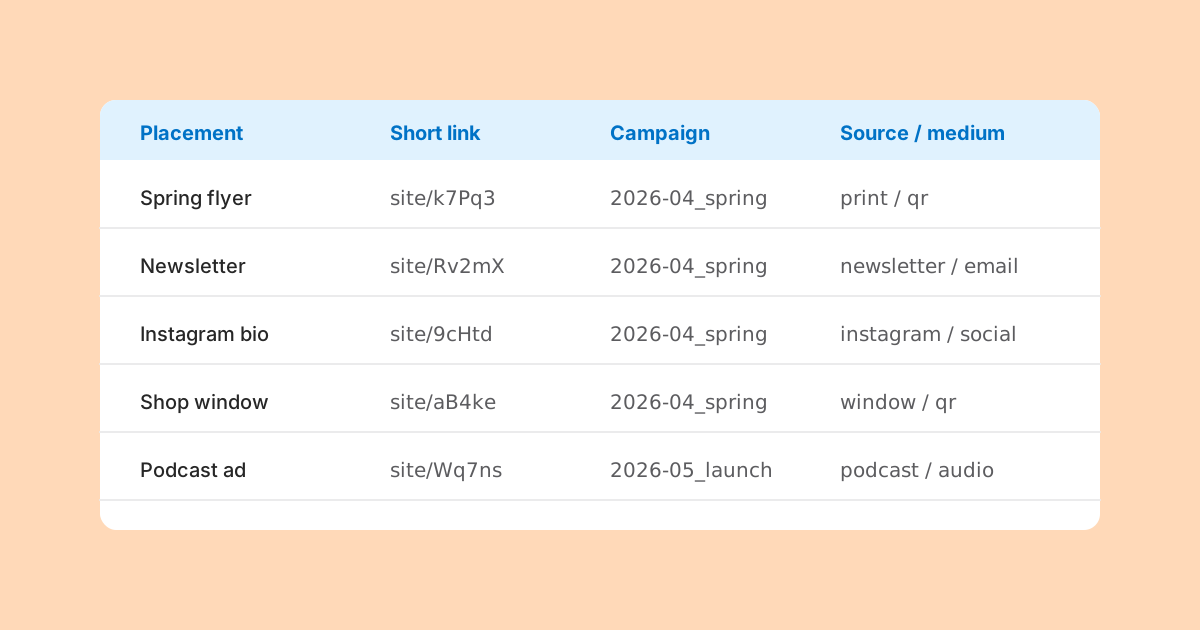
Nobody sets out to have four hundred short links. They arrive three at a time, each one urgent, each one taking about ninety seconds, and at no point does anybody decide that a system is now required.
Then a customer asks why the QR code on last spring's leaflet goes to the wrong page, and nobody can say which link that was, who made it, or what it was meant to point at. That is the moment the system becomes necessary, and it is the worst moment to start building one.
This guide assumes you are not using a link management product with folders and dashboards. LinkMint, for example, has no accounts, folders, tags or campaign views: you paste a URL and get a short link. That is not a problem, because the organising that matters was never really about the tool. It lives in a shared document that you control.
The problem is not volume
Four hundred rows is a small spreadsheet. The difficulty is not the number of links but three missing pieces of information: what each link is for, where it has been used, and which tags it carries. A link you can find but cannot explain is nearly as useless as one you cannot find.
So the system has three parts, and all of them can live in one shared spreadsheet:
- A naming convention, so related links sort together and each name explains itself.
- A UTM vocabulary, so tagged links produce clean, comparable reports in your analytics.
- A register of every short link: one row each, with where it is used.
The register: one row per link
The register is the heart of it. Every short link anyone makes gets a row, at the moment it is made. Not later, not at the end of the week. These are the columns that earn their place:
| Column | Example | Why it matters |
|---|---|---|
| Name | 2026-04_spring-menu_counter-card | Your human-readable label, built from the naming convention |
| Short link | the short URL, e.g. ending /k7Pq3 | The thing printed or posted |
| Destination | the full URL, tags included | What it should resolve to |
| utm_source / medium / campaign | counter-card / qr / spring-menu-2026 | Lets you match analytics rows back to links |
| utm_content | till-side | Distinguishes placements in one campaign |
| Used where | Counter cards, both shops, 500 printed | The question you will be asked in a year |
| Owner | Sam | Who to ask |
| Created | 2026-03-28 | Sorting and auditing |
| Status | live, superseded, retired | What to do about it now |
| Notes | Superseded by row 212 after price change | Anything a stranger would need |
The "used where" column is the one people skip and later regret. A destination tells you what a link does. Only the placement tells you who might still be scanning it. A link on a social post from two years ago is harmless; a link on two thousand printed menus still in circulation is not.
The naming convention does most of the work
A generated short code such as k7Pq3 tells you nothing. LinkMint codes are generated, five characters from an alphabet without look-alike characters, and cannot be chosen, so the code itself is never going to be meaningful. The register's name column carries the meaning instead.
A good name is built from the same parts every time, in the same order, so that sorting the column groups related links together:
2026-04_spring-menu_newsletter-top
2026-04_spring-menu_newsletter-footer
2026-04_spring-menu_counter-card
2026-05_summer-hours_window-poster
always-on_instagram-bio- Start with the year and month in the form YYYY-MM, so an alphabetical sort is also a chronological one.
- Then the campaign name, exactly matching utm_campaign where the link is tagged.
- Then the placement, specific enough to find the physical or digital thing it is on.
- Use a fixed prefix such as always-on for permanent links that do not belong to a campaign.
- Lower case and hyphens inside each part; underscores only between parts.
A UTM vocabulary on its own tab
If your links carry UTM parameters, your analytics reports are only as tidy as the values you type. Many analytics tools treat these values as case-sensitive, so instagram and Instagram become two rows, and email and e-mail become two channels. With hundreds of links and several people making them, drift is guaranteed unless the allowed values are written down.
Give the vocabulary its own tab in the same spreadsheet. List the allowed values for utm_source and utm_medium, with a one-line meaning for each, and a list of campaign names with their dates. Source, medium and campaign are expected by convention on every tagged link; term and content are optional and can follow looser rules, as long as each campaign uses them consistently.
| Field | Allowed value | Meaning |
|---|---|---|
| utm_medium | Any email we send | |
| utm_medium | social | Organic posts on social platforms |
| utm_medium | qr | Any printed QR code |
| utm_medium | Printed short link typed by hand | |
| utm_medium | referral | Links on partner or press sites |
| utm_source | newsletter | The monthly customer newsletter |
| utm_source | counter-card | Cards by the till in either shop |
| utm_campaign | spring-menu-2026 | Spring menu, April to May 2026 |
Adding a new value is allowed; inventing one on the spot is not. If someone needs a new source, they add it to the tab first, then use it. That one rule removes most of the mess in campaign reports.
Everything happens at creation time
Every organising scheme fails the same way: the link gets made in a hurry and the row gets filled in "later". Later does not come. So make the register part of making the link, in this order:
- Add the row and write the name, using the convention.
- Build the tagged URL from the vocabulary. The UTM builder at /utm-builder does this in your browser and avoids typos in the parameter names.
- Open the tagged URL and check the page is right.
- Shorten it. LinkMint keeps the query string byte for byte, so the tags survive.
- Paste the short link into the row, and fill in where it will be used.
This takes perhaps a minute longer than skipping it. It is the only minute in the whole process that cannot be recovered later.
Planning around a simple shortener
If you are using LinkMint, a few of its rules shape the register. None of them is a problem if you know about them in advance.
- Links cannot be edited. If a destination changes, you make a new short link, mark the old row as superseded and point to the new row. The old link keeps working, so decide whether its destination page still makes sense or needs a redirect on your own site.
- Links cannot be deleted and never expire. That is helpful for printed material, but it means retiring a link is a decision recorded in your register, not an action in the tool.
- Nothing is counted by the shortener. Results come from your own analytics, matched back to rows through the UTM values. That is why the tag columns matter.
- There is a rate limit of 10 new links per hour per connection, so a batch of fifty placements is a job to plan across a day, not to start ten minutes before a print deadline.
- To check where an existing short link goes without visiting it, put + in front of its code. That is the quickest way to audit a row.
Fixing a set that is already a mess
If you are reading this because the mess already exists, do not try to fix everything at once. Work backwards from the places links are still in use.
- Gather every short link you can find: from sent emails, social posts, print files, QR codes on the office wall.
- Give each one a row. For the destination, use the + preview rather than clicking through, so you see the full URL with its tags.
- Fill in "used where" first, because it decides priority. Anything still physically in circulation comes first.
- Give each row a name in the new convention. Do not try to rename the past in your analytics; just record what the old tags were.
- Mark rows as live, superseded or retired, and note why.
- From today, every new link goes through the creation steps above.
Old analytics data with inconsistent tags stays inconsistent. You can usually merge rows by hand when reporting (treating Newsletter and newsletter as the same), but it is easier to accept a clean break: from this month on, the vocabulary applies.
When more than one person creates links
Two people with different habits will produce two systems within a month. A few things keep a shared register honest:
- One spreadsheet, one location, linked from wherever people start work. Copies drift.
- Use data validation (a drop-down list) on the source, medium and campaign columns, fed from the vocabulary tab, so free typing is impossible.
- Freeze the header row and protect the vocabulary tab so only one or two people can change it.
- Give every row an owner. Questions about a link go to the owner, not to the whole team.
- Review the register once a month for empty cells. A row with no "used where" is a future mystery.
Tidy the register, not the links
The temptation with a messy list is to delete rows that look old. Resist it. A link from 2024 may still be on a menu, a business card or a sign in someone else's shop. Rows are cheap, and the history is what lets you answer "where did this come from?" when an old link turns up.
Instead, use the status column. Filter to live links for daily use, and leave superseded and retired rows in place with a note. A register that only shows the present cannot explain a QR code someone scans next year.
The habit that keeps it working
Every system here depends on one habit: no short link exists without a row. If that holds, everything else can be fixed later. Names can be cleaned, statuses updated, vocabularies extended. If it does not hold, no amount of tidying recovers the information, because the only record of where a link went was in someone's head on the day they made it.
Related reading
- UTM Parameters Explained Without the Marketing Jargon
Five labels you can add to a URL so your analytics can say where a visit came from. What each one means, which three matter most, and the small inconsistencies that quietly split your reports.
- Campaign Links vs Ordinary Links: What's the Difference?
Technically nothing. In practice, a campaign link carries a question you want answered, and that changes how it should be tagged, named and recorded.
- QR Codes and Short Links Work Better Together
Encoding a short link instead of a long address gives you a coarser, easier code and a line of text people can type. Here is what that buys you, what it does not, and how to plan for a destination that might change.