Printed QR Codes: Point Them at Something You Control
A printed QR code cannot be changed, so the decisions that matter happen before it reaches the printer: where it leads, how big it is, and whether it actually scans.
6 May 2026 · 8 min read · updated 10 October 2026
A QR code is a picture of a piece of text. Whatever you encode, whether a web address, a Wi-Fi password or a contact card, is physically present in the pattern of dark and light squares. That is why a code can be read without any service being involved, and why it cannot be edited once printed. Change the text and you change the pattern.
QR codes made with LinkMint work exactly this way. They are static: the content goes straight into the pattern, and the code is generated in your browser. There are no dynamic codes here whose destination can be changed later.
That makes the moment before printing the only moment that counts. This guide covers the two halves of getting it right: choosing a destination that will still make sense in a year, and producing a code that scans reliably on paper, card, vinyl or packaging.
Start with the destination, not the code
Most printed codes that fail do not fail because they will not scan. They fail because they scan perfectly and lead somewhere that is no longer right.
- The website is rebuilt and the old page addresses stop working.
- The code points at a PDF that is later replaced by a file with a different name.
- The campaign page is taken down when the campaign ends, while the posters stay up.
- The code leads to a third-party page, such as a booking or ordering service, that the business later stops using.
- A typo in the address is spotted after the print run has been delivered.
None of these is unusual, and none of them is fixed by a better-looking code. They are all fixed by the same rule: a printed code should lead to an address you control and intend to keep alive, whose content you can update.
Fragile:  https://example.com/files/menu-autumn-v3-FINAL.pdf
Durable:  https://example.com/menu
The first contains a season, a version number and the word FINAL, all of which will be wrong eventually. The second is a page that can hold whatever the menu is this week. The code is the same size either way; only one of them will still be right next spring.
Your options with LinkMint
Because LinkMint codes and links are fixed once made, the flexibility has to come from the destination. There are three sensible patterns.
Encode a permanent page on your own site
If you have a website, create a page with a plain address that you will not change, and update its content as things move. You can encode the address directly, or shorten it first and encode the short link. A shorter address produces a simpler pattern, which helps at small sizes.
Encode a short link
Paste the address into the shortener on the homepage, then put the short link into the QR code generator. The short link will always lead to the same destination, because LinkMint links cannot be edited, but it never expires and its code is never given to anyone else. Anyone can check where it goes by putting + in front of the code, which is a reassuring thing to be able to offer on a public poster.
Encode a bio page
If you do not have a website, a bio page is the most flexible option available here. You choose an address at /@yourname, build the page from blocks such as links, opening hours as text, contact details or a FAQ, and receive a private edit link. The printed code points at /@yourname. When something changes, you open the edit link and change the page. The code never needs reprinting.
| Printed item | Sensible destination | Why |
|---|---|---|
| Restaurant table card | Your own /menu page, or a bio page | The menu changes; the card should not |
| Event poster | A permanent events page | It can show the next event once this one ends |
| Business card | A bio page | One place for contact details, socials and links you can keep current |
| Product packaging | A support or product page you will maintain | Packaging lives for years in people's homes |
| Wi-Fi sign | No link: encode the network details directly | It is data, and should work with no connection |
When not to use a link at all
Some codes should carry their content directly. A Wi-Fi code holds the network name and password. A contact card code holds a name, number and email address. Phone, SMS, email and WhatsApp codes hold the details needed to start a message or call.
These are data, not destinations. Sending them through a link would add a dependency and, for a Wi-Fi password, send it somewhere it has no reason to go. The LinkMint generator makes all of these types in the browser, so the details you type are not sent to the server.
Error correction, explained accurately
QR codes include redundant data so that a scanner can rebuild the content when part of the code is damaged, dirty or covered. The standard defines four levels, each able to restore roughly a fixed share of the code's data.
| Level | Approximate share of data that can be restored | Typical use |
|---|---|---|
| L | About 7% | Clean screens and documents where space is tight |
| M | About 15% | General use |
| Q | About 25% | Print that may be scuffed, folded or creased |
| H | About 30% | Harsh conditions, or where part of the code will be covered |
The trade is density. Higher levels store more redundancy, so the same content needs more modules (the individual squares), and each module is smaller at a given print size. For a short web address the difference is modest. For long content it can push the code into a dense pattern that struggles at small sizes.
The LinkMint generator defaults to Q, which suits most print, and lets you choose any of the four. If you plan to place anything over the code after downloading it, remember that you are spending error correction to do so, and test carefully.
Size and scanning distance
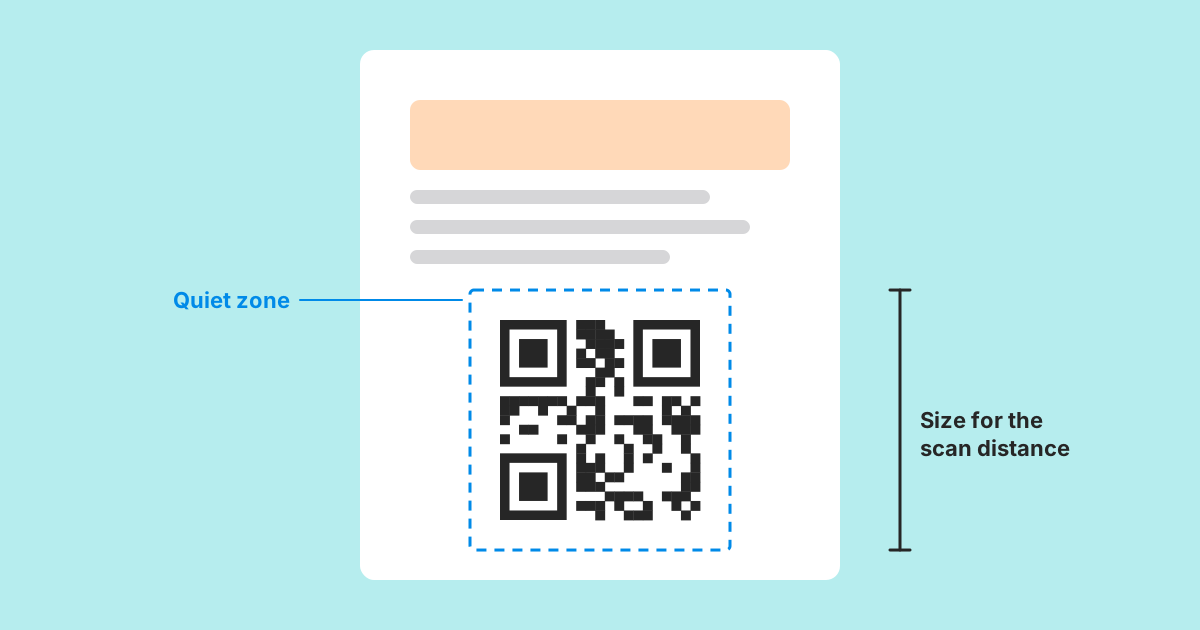
There is no single correct size, because it depends on how far away people will be and how dense the pattern is. A commonly used rule of thumb is that a code should be at least a tenth as wide as the distance it will be scanned from: about 3 cm across for a table card read from 30 cm, and considerably larger for a poster read from across a room. Treat that as a starting point, not a guarantee.
- Shorter content means fewer, larger modules at the same printed size, which is the strongest argument for encoding a short link rather than a long address.
- Download SVG for print. It is a vector format, so it stays sharp at any size; PNG is fine for screens and documents.
- Avoid curved surfaces and folds running through the code where you can. A code wrapped round a bottle or split by a crease is harder to read.
- Consider the finish. Gloss and laminate can reflect light straight back at the camera.
Contrast and the quiet zone
Scanners need a clear difference between the dark modules and the background. Dark on light is the safe choice. Light modules on a dark background, often called inverted codes, are not read by every scanner, and low contrast pairings such as mid grey on white or pastel on pastel fail more often than they look as if they should. The LinkMint generator warns about low contrast and about light-on-dark colours.
The quiet zone is the blank margin around the code. The QR standard asks for at least four modules of empty space on every side, and scanners use it to find where the code begins. The most common layout mistake is a designer cropping the margin tight and then placing text, a border or a photograph right up against the pattern. Keep the margin clear in the final artwork, not just in the downloaded file.
Leave the three large squares in the corners alone. These finder patterns tell the scanner where the code is and which way up it sits, and covering or restyling them beyond recognition causes more failures than any other decoration.
Test before you print, then test the print
A code that scans on your screen can still fail on paper. Testing takes a few minutes and is the only reliable check.
- Check the destination first. For a short link, put + in front of the code to see exactly where it leads.
- Scan the downloaded file from your screen with at least two different phones, ideally one older model.
- Print a proof at the real size, on the real material if you can, and scan it from the real distance.
- Try it in the lighting where it will be used: a dim bar, a bright shop window, a station platform.
- Confirm the page it opens works well on a phone, because everyone arriving from a QR code is on one.
- If you used a bio page, confirm you can open the edit link and that it is stored safely.
A note on counting scans
LinkMint records nothing when someone follows a short link or opens a bio page, so it cannot tell you how many people scanned a code. If you want to see visits from printed material, add UTM parameters to your own page address with the UTM builder, then shorten and encode the result. Query strings are kept exactly, so your own website analytics can see visits tagged with, for example, utm_source=poster. That counts visits to your site, and it will include anyone who typed or shared the same link, so give each printed item its own tagged address if you want to compare them.
The printing checklist
- The destination is an address you control and will keep alive.
- Its content can be updated: a permanent page on your site, or a bio page with the edit link saved.
- Data such as Wi-Fi details or contact cards is encoded directly, not behind a link.
- Error correction is Q or H for anything likely to be handled or weathered.
- The code is large enough for its scanning distance, and exported as SVG for print.
- Dark modules on a light background, with a clear margin of at least four modules all round.
- The finder patterns in three corners are untouched.
- A printed proof has been scanned by more than one phone in realistic conditions.
A printed QR code is a small promise that will be tested by strangers for as long as the paper lasts. Point it at something you will look after, make it easy to read, and test it before the printer does the irreversible part.
Related reading
- QR Codes and Short Links Work Better Together
Encoding a short link instead of a long address gives you a coarser, easier code and a line of text people can type. Here is what that buys you, what it does not, and how to plan for a destination that might change.
- Dynamic vs Static Links: What Actually Changes?
Dynamic usually means a link whose destination you can change after publishing. Static means you cannot. Here is what that really costs, when each is right, and how to plan when all you have is static.
- Seven Places Businesses Can Use QR Codes More Effectively
Seven placements where a printed QR code beats the alternative, with what to encode, how big to print it and what it should open for each.